# Moodle-Instanz auf Status, Serverkonfiguration überprüfen (z.T. auch ohne Account)

["Check Security &amp; Maintenance Status" Folien von der Moodlemoot DACH 2026 Zürich (ENG)](https://de.slideshare.net/slideshow/comprehensive-guide-to-moodle-security-and-maintenance-status-checks-d8e0/288366029)

Inhalte aus der Präsentation nochmal aufgearbeitet und auf deutsch.

## Wie man überprüfen kann, ob man ein aktuelles (sicheres) Moodle benutzt

###  

### Prüfung der security.txt Datei

https://**MOODLE-INSTANZ-URL**.de**/security.txt**

Datei öffnen und in der letzten Zeile nachschauen welches Datum dort steht.

Beispiel:

```
Expires: 2026-10-26T01:00:00.000Z
```

<span style="color: rgb(224, 62, 45);">"Expires" Ablauf-Datum in der Vergangenheit = abgelaufen</span>

<span style="color: rgb(22, 145, 121);">"Expires" Ablauf-Datum noch nicht erreicht = nicht abgelaufen</span>

<span style="color: rgb(0, 0, 0);">Je näher das aktuelle Datum an dem "Expires" Ablauf-Datum liegt, desto wahrscheinlicher ist es, dass die Moodle Instanz nicht das letzte Update (die aktuellste Patch Version x.y.**Z**) hat.</span>

<span style="color: rgb(0, 0, 0);">Wenn die security.txt nicht öffentlich zugreifbar ist, dann würde ich davon ausgehen, dass die IT deren Sinn eventuell nicht verstanden hat. Vermutlich wird sie meistens versteckt, weil man nicht nach außen zeigen möchte, dass das Moodle nicht aktuell ist.</span>

<span style="color: rgb(0, 0, 0);">Mehr Infos dazu: [https://de.wikipedia.org/wiki/Security.txt](https://de.wikipedia.org/wiki/Security.txt)</span>


###  

### Offen liegende Dateien auslesen

Es gibt im Laufe der Moodle Entwicklung mehrere Anhaltspunkte dafür eine Moodle Versionsnummer von außen zu ermitteln. Eine Übersicht zu den jeweiligen Dateien gibt es weiter unten. Hier beziehe ich mich nur auf die Dateien, die vor dem Wechsel auf Moodle 5.1.x relevant sind.

Für die Versionen vor 5.1.x ist meistens die https://**MOODLE-INSTANZ-URL**.de**/UPGRADING.md** Datei relevant.

Wenn die Datei nicht zugreifbar ist, dann ist der Server vermutlich korrekt konfiguriert und es ist alles wie es sein soll.

###  

### Offen liegende Dateien verhindern

Site-Administration -&gt; Berichte -&gt; Sicherheitsprüfung

Hier kann man unter "Alle öffentlichen / privaten Pfade prüfen" überprüfen, ob der Server richtig konfiguriert ist oder ob noch Konfigurationsbedarf besteht.

Falls noch rote Problemfälle sichtbar sind, dann hier genauer nachschauen für die Behebung der Probleme:

[https://docs.moodle.org/405/de/Apache](https://docs.moodle.org/405/de/Apache)

[https://docs.moodle.org/405/de/Nginx](https://docs.moodle.org/405/de/Nginx)

### Moodle App Download Link

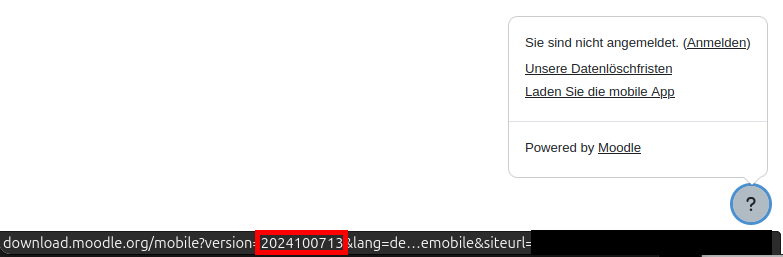
[![Moodle mobile App Link with Version marked with red.png](https://kb.moodle-an-hochschulen.de/uploads/images/gallery/2026-09/scaled-1680-/moodle-mobile-app-link-with-version-marked-with-red.png)](https://kb.moodle-an-hochschulen.de/uploads/images/gallery/2026-09/moodle-mobile-app-link-with-version-marked-with-red.png)
#### Reguläres Release

Die **ersten 8 Stellen** sind das Releasedatum vom Versionsbranch in Version x.y.0.

20200615 -&gt; 3.9  
20201109 -&gt; 3.10  
20210517 -&gt; 3.11  
20220419 -&gt; 4.0  
20221128 -&gt; 4.1  
20230424 -&gt; 4.2  
20231009 -&gt; 4.3  
20240422 -&gt; 4.4  
**20241007** -&gt; **4.5**  
20250414 -&gt; 5.0  
20251006 -&gt; 5.1  
20260420 -&gt; 5.2  
20261005 -&gt; 5.3

(Quelle für Mapping [https://moodledev.io/general/releases)](https://moodledev.io/general/releases))

In diesem Fall sind wir auf einem **4.5**.x LTS

Die **13** ist dann die **Patch Release** Version.

Also kann man daraus die genaue Version **4.5.13** ableiten.

#### Weekly Release

Erkennt man daran, dass es noch einen .xy Zusatz gibt. Also .01, .02 usw.

Das sind dann die Versionen mit + hinten dran.

Beispiel: **2025100603.13**

**20251006** -&gt; 5.1

**03** -&gt; .3

**.13** -&gt; + (inkrementelle Version)

=&gt; **5.1.3+** (13. inkrementelles Update nach dem Release von 5.1.3)

###  

### Sichtbarkeit der Moodle Version über den Download Link verhindern

Site-Administration -&gt; Allgemein -&gt; Mobile app -&gt; Mobile Darstellung

[![grafik.png](https://kb.moodle-an-hochschulen.de/uploads/images/gallery/2026-10/scaled-1680-/f0Cgrafik.png)](https://kb.moodle-an-hochschulen.de/uploads/images/gallery/2026-10/f0Cgrafik.png)

Am Ende des Links eine # hinzufügen.

[![grafik.png](https://kb.moodle-an-hochschulen.de/uploads/images/gallery/2026-10/scaled-1680-/QPRgrafik.png)](https://kb.moodle-an-hochschulen.de/uploads/images/gallery/2026-10/QPRgrafik.png)

Speichern und fertig.

### Als Admin in Moodle nach der Versionsnummer der Instanz schauen

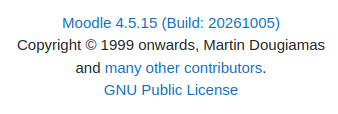
Website-Administration -&gt; Allgemein -&gt; Systemnachrichten (erster Link)

Site Administration -&gt; General -&gt; Notifications (erster Link)

Dann runter scrollen und da müsste dann die Version sichtbar sein:

[![grafik.png](https://kb.moodle-an-hochschulen.de/uploads/images/gallery/2026-10/scaled-1680-/grafik.png)](https://kb.moodle-an-hochschulen.de/uploads/images/gallery/2026-10/grafik.png)
#### Informationen zur Geschichte relevanter Dateien für die Versionsidentifizierung von Moodle

**<span style="font-family: 'Arial'; font-size: 11pt; color: #000000; mso-style-textfill-fill-color: #000000;">/security.txt</span>**

<span style="font-family: 'Arial'; font-size: 11pt; color: #000000; mso-style-textfill-fill-color: #000000;">(sollte immer öffentlich zugänglich sein)</span>

<span style="font-family: 'Arial'; font-size: 11pt; color: #000000; mso-style-textfill-fill-color: #000000;">Moodle 3.9.4, 3.10.1 und 3.11.0 bis jetzt</span>

<span style="font-family: 'Arial'; font-size: 11pt; color: #000000; mso-style-textfill-fill-color: #000000;">Enthält immer einen „Expires:“ Eintrag am Ende:</span>

<span style="font-family: 'Arial'; font-size: 11pt; color: #000000; mso-style-textfill-fill-color: #000000;">Format zu Beginn </span><span style="font-family: 'Arial'; font-size: 11pt; color: #000000; mso-style-textfill-fill-color: #000000;">„</span><span style="font-family: 'Arial'; font-size: 11pt; color: #000000; mso-style-textfill-fill-color: #000000;">Natural Language</span><span style="font-family: 'Arial'; font-size: 11pt; color: #000000; mso-style-textfill-fill-color: #000000;">“</span><span style="font-family: 'Arial'; font-size: 11pt; color: #000000; mso-style-textfill-fill-color: #000000;">:  
 </span><span style="font-family: 'Courier New'; font-size: 11pt; color: #000000; mso-style-textfill-fill-color: #000000;">Expires: Mon, 31 May 2021 01:00:00 +0000</span><span style="font-family: 'Courier New'; font-size: 11pt; color: #000000; mso-style-textfill-fill-color: #000000;"> </span>

<span style="font-family: 'Arial'; font-size: 11pt; color: #000000; mso-style-textfill-fill-color: #000000;">ab Moodle 4.0.0 „</span><span style="font-family: 'Arial'; font-size: 11pt; color: #000000; mso-style-textfill-fill-color: #000000;">ISO 8601</span><span style="font-family: 'Arial'; font-size: 11pt; color: #000000; mso-style-textfill-fill-color: #000000;">“:  
 </span><span style="font-family: 'Courier New'; font-size: 11pt; color: #000000; mso-style-textfill-fill-color: #000000;">Expires: 2022-12-05T01:00:00.000Z</span>

**<span style="font-family: 'Arial'; font-size: 11pt; color: #000000; mso-style-textfill-fill-color: #000000;">/</span><span style="font-family: 'Arial'; font-size: 11pt; color: #000000; mso-style-textfill-fill-color: #000000;">README.txt</span>**

<span style="font-family: 'Arial'; font-size: 11pt; color: #000000; mso-style-textfill-fill-color: #000000;">Moodle 1.0.0 - 4.3</span><span style="font-family: 'Arial'; font-size: 11pt; color: #000000; mso-style-textfill-fill-color: #000000;">.12</span>

<span style="font-family: 'Arial'; font-size: 11pt; color: #000000; mso-style-textfill-fill-color: #000000;">In der README.txt kommt z.B. in der ersten Zeile sowas vor:  
</span><span style="font-family: 'Arial'; font-size: 11pt; color: #000000; mso-style-textfill-fill-color: #000000;">README $Id: README.txt,v 1.9.14.1 2007/11/14 23:40:50 Exp $</span>

<span style="color: rgb(149, 165, 166);">**<span style="font-family: 'Arial'; font-size: 11pt;">/README.md</span>**</span>

<span style="font-family: 'Arial'; font-size: 11pt; color: #000000; mso-style-textfill-fill-color: #000000;">Moodle 4.4.0</span><span style="font-family: 'Arial'; font-size: 11pt; color: #000000; mso-style-textfill-fill-color: #000000;"> - jetzt</span>

<span style="font-family: 'Arial'; font-size: 11pt; color: #000000; mso-style-textfill-fill-color: #000000;">Seit Moodle 5.1.0 im Projekt root (webroot Wechsel auf public)</span>

<span style="font-family: 'Arial'; font-size: 11pt; color: #000000; mso-style-textfill-fill-color: #000000;">Enthält meistens keine Versionsinformationen</span>

**<span style="font-family: 'Arial'; font-size: 11pt; color: #000000; mso-style-textfill-fill-color: #000000;">/lib/</span><span style="font-family: 'Arial'; font-size: 11pt; color: #000000; mso-style-textfill-fill-color: #000000;">upgrade.txt</span>**

<span style="font-family: 'Arial'; font-size: 11pt; color: #000000; mso-style-textfill-fill-color: #000000;">Moodle 2.2.0 - 4.4.12 inklusive der Änderungen</span>

<span style="font-family: 'Arial'; font-size: 11pt; color: #000000; mso-style-textfill-fill-color: #000000;">seit Moodle 4.5.0 ohne die Änderungen (die wurden dann in der UPGRADING.md weitergeführt) und in </span>

<span style="font-family: 'Arial'; font-size: 11pt; color: #000000; mso-style-textfill-fill-color: #000000;">Moodle 5.1</span><span style="font-family: 'Arial'; font-size: 11pt; color: #000000; mso-style-textfill-fill-color: #000000;">.0 wurde die **/lib/upgrade.txt** entfernt</span>

**<span style="font-family: 'Arial'; font-size: 11pt; color: #000000; mso-style-textfill-fill-color: #000000;">/UPGRADING.md</span>**

<span style="font-family: 'Arial'; font-size: 11pt; color: #000000; mso-style-textfill-fill-color: #000000;">Moodle 4.5</span><span style="font-family: 'Arial'; font-size: 11pt; color: #000000; mso-style-textfill-fill-color: #000000;">.0</span>

<span style="font-family: 'Arial'; font-size: 11pt; color: #000000; mso-style-textfill-fill-color: #000000;">Versionserwähnung ist generell mit zwei führenden Rauten gekennzeichnet</span>

<span style="font-family: 'Arial'; font-size: 11pt; color: #000000; mso-style-textfill-fill-color: #000000;">\## 5.0.10</span>

<span style="font-family: 'Arial'; font-size: 11pt; color: #000000; mso-style-textfill-fill-color: #000000;">Seit Moodle 5.1.0 im Projekt root (webroot Wechsel auf public)</span>

<span style="color: rgb(149, 165, 166);">**<span style="font-family: 'Arial'; font-size: 11pt;">/composer.json</span>**</span>

<span style="font-family: 'Arial'; font-size: 11pt; color: #000000; mso-style-textfill-fill-color: #000000;">Moodle 2.3.4</span>

<span style="font-family: 'Arial'; font-size: 11pt; color: #000000; mso-style-textfill-fill-color: #000000;">Seit Moodle 5.1.0 im Projekt root (webroot Wechsel auf public)</span>

<span style="font-family: 'Arial'; font-size: 11pt; color: #000000; mso-style-textfill-fill-color: #000000;">Beinhaltet nur die composer.json, die man mit denen aus dem Git vergleichen könnte, um Rückschlüsse auf die Moodle Version zu haben. Die anderen Dateien ermöglichen das aber meistens einfacher.</span>

Autor: [Philipp Kropp](https://forum.moodle-an-hochschulen.de/user/profile.php?id=225 "Philipp Kropp"), Christian-Albrechts-Universität zu Kiel
